
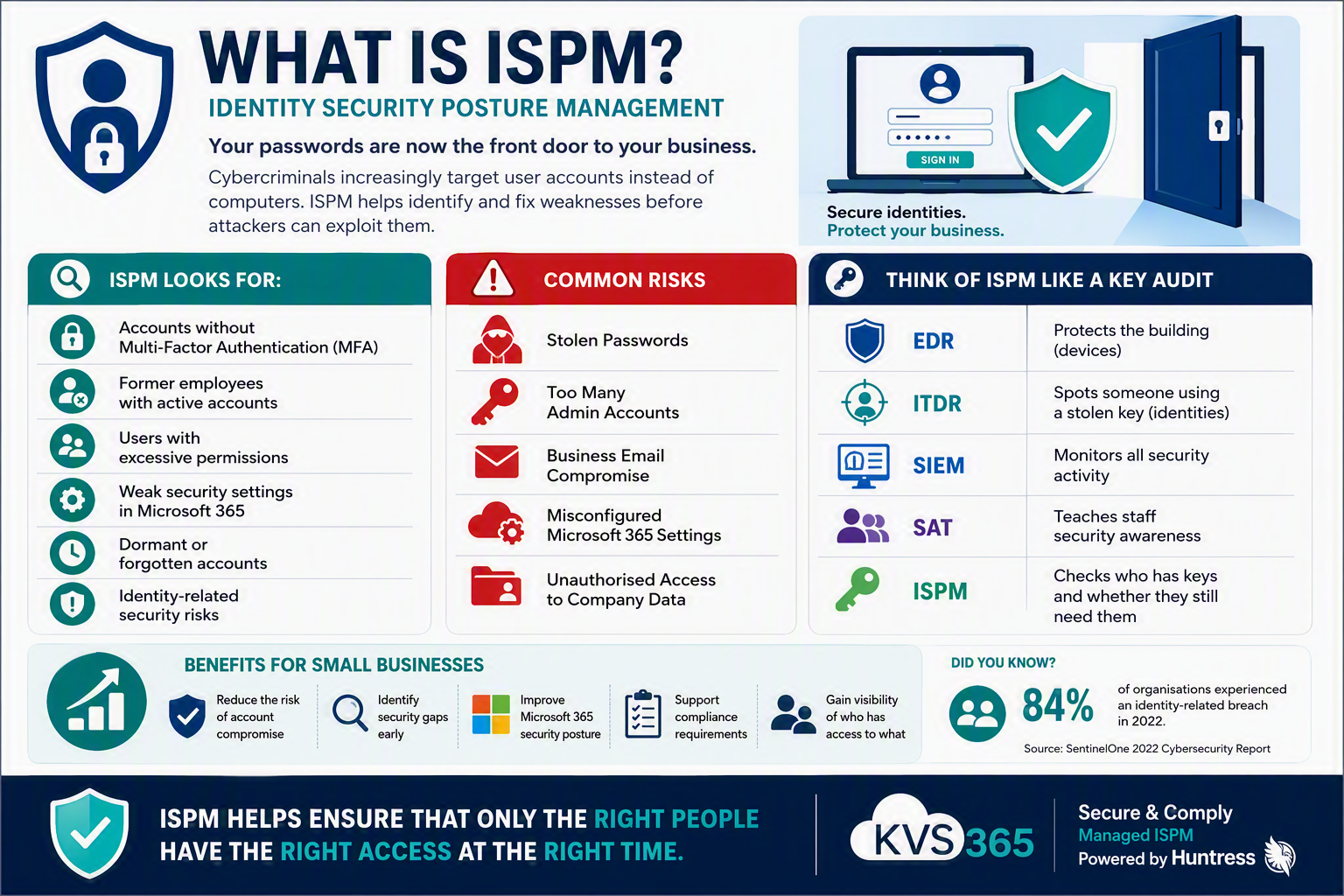
What is ISPM and Why Should Small Businesses Care?
If you’ve been following our cybersecurity blog series, you’ve probably noticed a recurring theme: cybercriminals are increasingly targeting identities rather than devices.
A few years ago, hackers focused mainly on infecting computers with viruses. Today, they’re far more likely to steal a username and password, log in as a legitimate user, and quietly access email, files, and business systems.
That’s where ISPM, or Identity Security Posture Management, comes in.
ISPM helps businesses find and fix weaknesses in Microsoft 365 and other identity systems before criminals can exploit them. It focuses on protecting user accounts, permissions, and access settings rather than just devices or networks.
Think of Your Business Like an Office Building
Imagine your office building has:
- Front doors
- Staff entrances
- Master keys
- Visitor passes
- Security alarms
Traditional cybersecurity products are like the locks and alarms.
ISPM is more like the security manager who regularly checks:
- Who has keys?
- Do former employees still have access?
- Does anyone have access they don’t actually need?
- Are all security rules being followed?
Without these checks, an attacker only needs to find one forgotten key.
Why Identity Has Become the New Target
Most businesses now work in the cloud.
Your staff log into:
- Microsoft 365
- Teams
- SharePoint
- OneDrive
- CRM systems
- Accounting software
The username and password have effectively become the keys to your business.
Cybercriminals know this.
Rather than spending days trying to break into a firewall, they often:
- Steal passwords through phishing emails
- Buy credentials from criminal marketplaces
- Exploit weak security settings
- Reuse passwords leaked from other websites
Once they have a valid login, they can often access company data without triggering traditional security alerts. Identity-focused attacks have become one of the most common methods used by attackers.
What Does ISPM Actually Do?
ISPM continuously reviews your identity environment and highlights risks.
It looks for things such as:
Accounts Without Multi-Factor Authentication
If someone can log in with only a password, the account is at greater risk.
ISPM identifies these accounts so they can be secured.
Excessive Permissions
Many users accumulate access over time.
Someone who only needs access to HR documents might accidentally have permissions to financial records, SharePoint administration, or security settings.
ISPM helps identify and reduce unnecessary privileges.
Former Employees Still Active
When staff leave, their accounts should be disabled promptly.
Unfortunately, this doesn’t always happen.
ISPM highlights dormant, inactive, or forgotten accounts that could be exploited by attackers.
Risky Configuration Settings
Microsoft 365 contains hundreds of security options.
ISPM checks these settings against security best practices and identifies weaknesses before they become problems.
A Real-World Example
Imagine Sarah leaves your company.
Her Microsoft 365 account isn’t deleted because someone thinks they might need old emails in the future.
Six months later:
- The account still exists
- MFA has been disabled
- Nobody monitors it
- Nobody realises it is still active
An attacker discovers the old password from a previous data breach and gains access.
They now appear to be a genuine user.
Traditional antivirus may never see the attack.
ISPM would have flagged that account long before it became a problem.
How ISPM Fits With Other Security Services
Think of cybersecurity as layers:
| Service | Protects |
|---|---|
| EDR | Devices and laptops |
| ITDR | Active identity threats and suspicious sign-ins |
| SIEM | Security monitoring and alerting |
| SAT | Human users and phishing awareness |
| ISPM | Identity security settings and configurations |
Each layer plays a different role.
ISPM is focused on finding weaknesses before attackers can exploit them. Rather than waiting for an attack, it helps prevent one from happening in the first place.
What Does Huntress Managed ISPM Do?
Huntress describes Managed ISPM as continuous Microsoft 365 and identity hardening managed by security experts. It helps organisations gain visibility into accounts, permissions, authentication settings, and identity risks across their environment.
This means small businesses can benefit from enterprise-grade identity security without needing a dedicated in-house security team.
Why This Matters for Small Businesses
Many small business owners assume hackers only target large enterprises.
Unfortunately, that’s no longer true.
Small businesses often have:
- Fewer security controls
- Limited IT resources
- Valuable customer data
- Access to larger supply chains
Cybercriminals know this.
A compromised Microsoft 365 account can lead to:
- Data theft
- Invoice fraud
- Business email compromise
- Ransomware attacks
- Reputational damage
ISPM helps reduce these risks by ensuring your identity environment remains secure and properly configured.
The KVS365 View
At KVS365, we see identity security becoming just as important as antivirus was ten years ago.
Most cyberattacks now start with a compromised identity rather than a compromised device.
That’s why our Security & Compliance as a Service offering combines:
- Managed EDR
- Managed ITDR
- Managed SIEM
- Security Awareness Training
- Managed ISPM
Together, these services provide protection across devices, users, identities, and Microsoft 365.
Because the best cyberattack is the one that never gets the chance to happen.
Quick Summary
ISPM (Identity Security Posture Management) helps organisations identify and fix weaknesses in Microsoft 365 identities, user accounts, permissions, and authentication settings before attackers can exploit them. It continuously monitors identity security and helps ensure your business follows best practices for protecting access to systems and data.
Leave a Reply